

 In a previous experiment, AI identified roughly half the usability problems that trained researchers found in a video of a usability test session.
That sounds promising. If AI can find usability issues, it can substantially increase the amount of usability testing that research teams can conduct.
But in our analysis of that video, AI generated nearly as many additional problems that humans never flagged. Are these problems hidden gems missed by multiple researchers, or just AI hallucinations?
For this article, we classified all the unique problems the AIs generated into one of three categories:
- a real problem humans missed
- a false alarm (a true observation misread as a usability problem)
- a hallucination (something the AI reported that simply never happened)
What we found suggests that the new AI problems are mostly false alarms, but there are some notable exceptions.
Experimental Design: Four Researchers, Two LLMs, and One Video
For this study, we had four humans (professional UX researchers working at MeasuringU) review a video from a previous usability benchmark study of online dining reservation websites. Each researcher independently created a list of the usability issues they observed in the six-minute video.
We ran the video through two LLMs (ChatGPT-5.4 Thinking and Gemini 3 Flash Thinking) four times using the same prompt each time.
So in this study, we held constant the video, the key elements of the prompt, and the LLM versions/settings—variables that we plan to vary in future studies. This time, we varied only the type of analyst: human, ChatGPT, and Gemini.
Gemini Finds a Jewel; ChatGPT Goes on a Tangent
Using the human-generated and -verified problem lists as the “gold standard,” Figure 1 shows a summary of what we found.
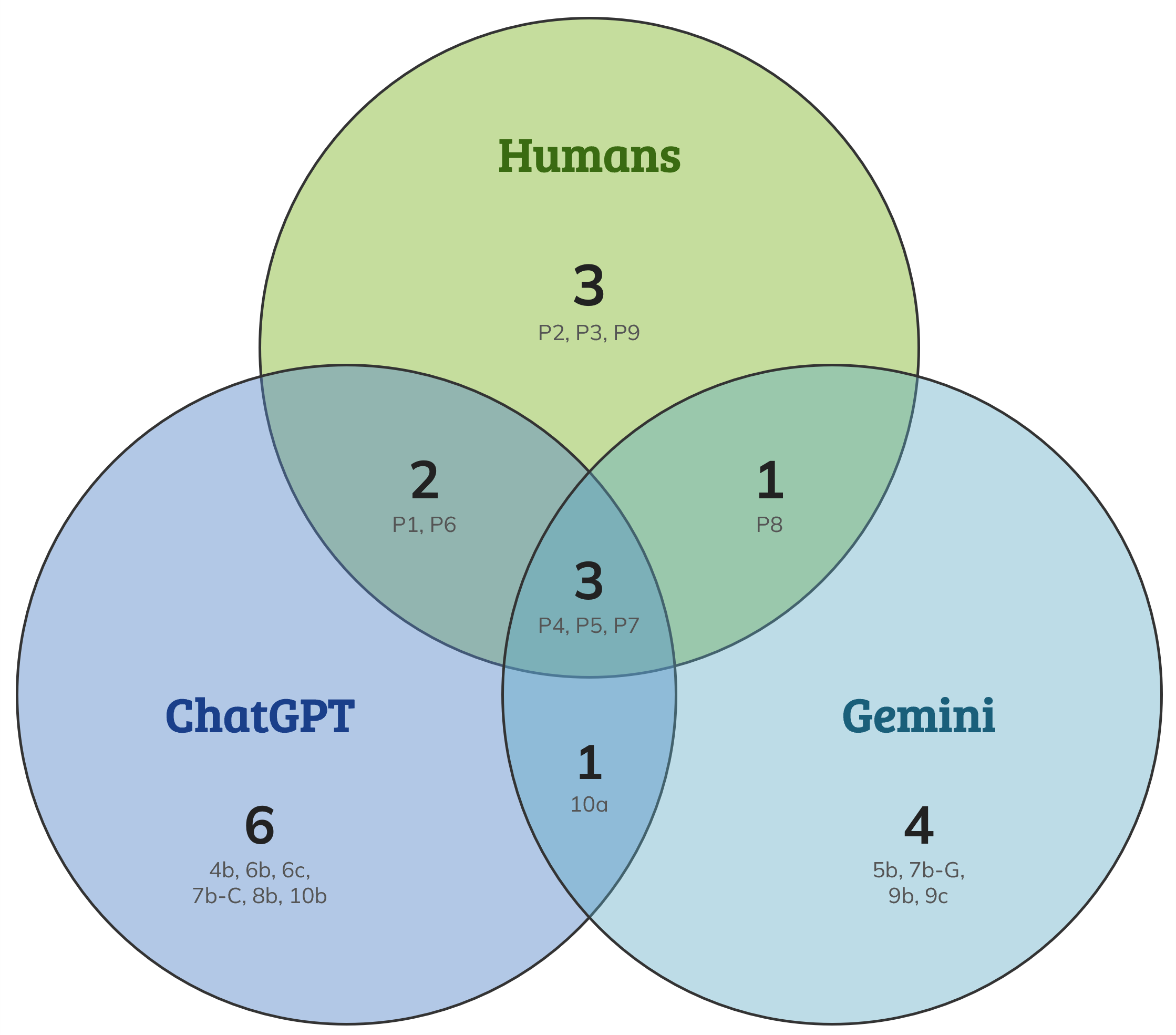
Figure 1: Venn diagram of usability problem discovery by humans, ChatGPT, and Gemini.
We know Venn diagrams can generate some bad high school math memories, so here’s a summary for all our sanity:
- Four human researchers found nine problems (3 + 2 + 3 + 1).
- Two AIs combined found 14 problems (6 + 1 + 3 + 4).
- Only three problems were found by researchers and both AIs (the 3 in the middle of the circles).
- ChatGPT matched five of the nine researcher-identified problems (3 + 2).
- Gemini matched four (3 + 1) of the researcher-identified problems.
- That leaves 11 problems the AIs flagged that no researcher identified (6 + 1 + 4).
- Of those 11 problems, six were unique to ChatGPT, four were unique to Gemini, and one was identified by both AIs.
So, AIs generated 11 new problems not identified by any of the human researchers. Table 1 has details of those 11 problems, listed in chronological order using problem number codes from the previous article. Of the 11 problems no human flagged, one was a genuine find, seven were false alarms, and three were hallucinations. Here’s more detail about each category.
| Prob # | Problem Description | Source | Classification |
|---|---|---|---|
| 4b | Filters not helpful | ChatGPT | False alarm |
| 5b | Participant used Ctrl-F to search for "sushi" when it wasn't in the 86-cuisine list | Gemini | Genuine find |
| 6b | Search results for sushi included many non-sushi restaurants | ChatGPT | False alarm |
| 6c | Weak presentation of cuisine information in search results | ChatGPT | False alarm |
| 7b-Gem | Participant chose the highest price tier | Gemini | Hallucination |
| 7b-GPT | Sorting by highest rated surfaced many non-sushi restaurants | ChatGPT | False alarm |
| 8b | UI pushes browsing without good decision support | ChatGPT | False alarm |
| 9b | Seating options only presented after selecting reservation time | Gemini | False alarm |
| 9c | Participant set time to 5:10 instead of 5:00 | Gemini | Hallucination |
| 10a | Selected restaurant labeled "seafood" rather than "sushi" by OpenTable | Both | False alarm |
| 10b | Task not completed—participant never reached the reservation form | ChatGPT | Hallucination |
Table 1: The 11 AI-generated problems not identified by any human researcher, classified by type.
Gemini’s Genuine Find
Let’s start with the good news: All four Gemini runs identified that after the participant expanded the cuisine filter to show all 86 cuisines, she used Ctrl-F to search the page for “sushi” (5b-Gem)—an event not reported by any of the human evaluators. It happened quickly, so it’s possible that the search field was not in the visual focus of the humans who were likely examining the list of cuisines (Figure 2). We consider this a true usability problem because (1) this behavior was driven by poor filter design and (2) it was unsuccessful—the word “sushi” was not on the page even though the cuisine filter was fully expanded.
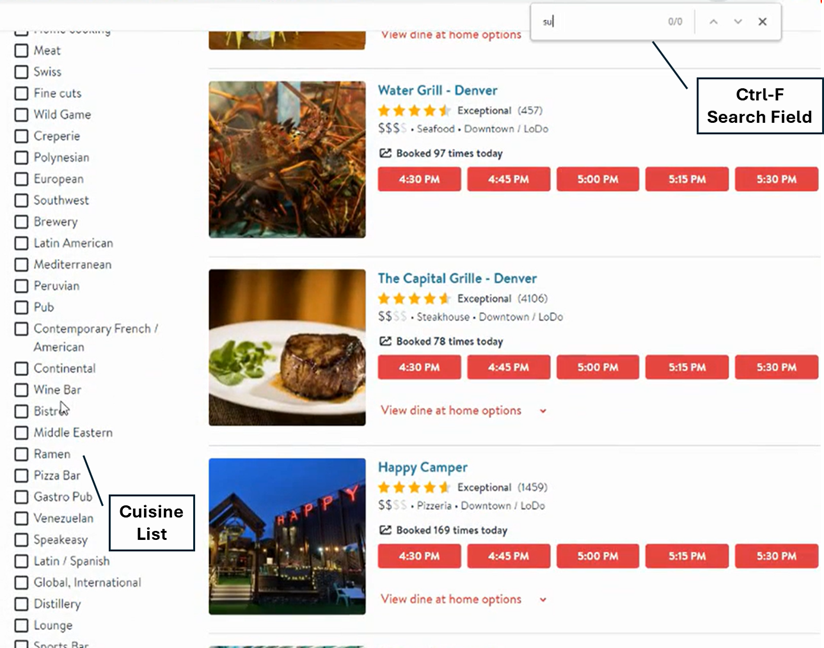
Figure 2: Frame from video showing Ctrl-F search field with first few letters of “sushi” typed at the top right of the screen and 28 of the 86 cuisine types on the left.
Seven False Alarms
Next, the not-so-good news. When a researcher identifies something that happened, but it’s not really considered a problem, it’s referred to as a false alarm. Sometimes things are literally a feature and not a bug! From our interpretation, AIs generated seven false alarms (not too different from what you sometimes see with a group of human evaluators).
The seafood/sushi labeling issue (6b, 6c, 7b-GPT, 8b, 10a)
Five of the seven false alarms (6b, 6c, 7b-GPT, 8b, 10a) were derived from ChatGPT taking the search for sushi restaurants too literally. After searching for sushi, many OpenTable results were labeled “seafood.” ChatGPT flagged this repeatedly across multiple runs in different ways (e.g., weak cuisine presentation, non-sushi results surfacing, poor decision support), but they all trace back to the same fundamental observation. ChatGPT only considered acceptable restaurants that OpenTable labeled as sushi restaurants, not restaurants that serve sushi on the menu, regardless of OpenTable’s labeling.
The restaurant the participant ultimately selected was labeled seafood, which led ChatGPT to declare task failure in three of four runs. The human reviewers took a more pragmatic view: the restaurant served sushi, so the participant successfully completed the task. Gemini flagged the same seafood/sushi labeling issue once (10a) but didn’t spiral into multiple variations of it.
Seating options not shown until after time selection (9b-Gem)
OpenTable withholds seating options until you pick a time. Given the range of possible seating configurations (inside, patio, bar, banquette, communal, high top, private, counter), showing them before a time is selected isn’t really feasible. And if a seating option doesn’t work out, the recovery path is low friction. Gemini flagged this as a problem. The human researchers recognized this as a design tradeoff rather than a usability problem.
Filters not helpful (4b-GPT)
We categorized this as a false alarm because it was overly vague. It’s true that there were issues with some filters (e.g., cuisine), but that was not true of all filters.
Three Hallucinations
In contrast to false alarms, which we consider misinterpretations of events that happened, a hallucination is when a problem is associated with something that just didn’t happen. We saw three of these.
AI claimed the participant incorrectly selected the highest price tier (7b-Gem)
From the narrative of the second Gemini run:
The task required selecting a restaurant that was not the lowest or highest price point.
Problem: The participant chose Ocean Prime, which is a restaurant (the highest tier on the platform). At 05:13, the participant verbally identified this as “mid-range.”
User Impact: The participant technically failed this part of the task constraints.
This didn’t happen. Ocean Prime had a mid-range price designation.
AI claimed the participant set the reservation time for 5:10 pm (9c-Gem)
From the narrative of the second Gemini run:
The participant selected Ocean Prime at 05:10
This didn’t happen. The participant, in accordance with the task instructions, selected 5:00 pm.
AI claimed the participant did not reach the reservation form (10b-ChatGPT)
From the narrative of the second ChatGPT run:
By the end of the clip, they are still comparing list items and time slots; they do not appear to reach the restaurant detail/reservation form step.
This isn’t accurate. The clip ended with the participant selecting the reservation time, then standard dining room seating, then stopping before entering her personal information.
The good news is that there were only three hallucinations out of 11 AI-generated problems. The bad news is you can’t know which AI-generated problem descriptions were hallucinated without watching the video and reviewing all the problems yourself.
Summary and Discussion
In this article, we focused on qualitative similarities and differences in the usability problems listed by professional human UX researchers and two AIs (Gemini 3 Flash Thinking and ChatGPT-5.4 Thinking) after reviewing a video in which a participant made a restaurant reservation.
Our key findings were:
False alarms and hallucinations dominate. Of the 11 problems the AIs generated that no human flagged, seven (64%) were false alarms, three (27%) were hallucinations, and one (9%) was a genuine find. That’s a useful number to keep in mind: roughly nine out of ten AI-only problems in this study required either correction or dismissal.
AI adds value as a junior researcher, not a trusted expert. AI was able to find one problem (a participant had to use Ctrl-F) that was real and useful and not found by humans. But getting to it required reviewing ten other problems that ranged from technically true but irrelevant to simply fabricated. The ROI depends on how much that review costs you.
Most false alarms came from a single fixation. Five of the seven traced back to ChatGPT interpreting “sushi restaurant” more literally than any human would. At least in this video and our criteria for what constitutes a problem, this is a systematic bias worth knowing about if you’re using these models for task-based evaluations.
Hallucinations were infrequent but consequential. Three of the problems (27%) were hallucinations. Although nominally low, this is probably too high for most applications. You can’t catch those without going back to the video, which means human review isn’t optional.
Like humans, AI usability reviews of videos are prone to the “evaluator effect.” Just like with human evaluators, multiple runs of AI usability evaluations of videos are not perfectly consistent, so it’s good practice to run these evaluations multiple times for consistency checks. Two of the three hallucinations came from the same Gemini run. Running multiple evaluations and looking for consistency across runs is a practical filter before any human review.
Bottom line: AI usability reviews of videos require human oversight. In their current form (what we tested), these AI products can add value to this type of UX research, but more as junior researchers whose actions and conclusions require expert human oversight rather than as trusted experts themselves.