

 You may have become numb to the overhyped headlines about AI.
But it’d be wrong to dismiss the impact AI can have on our industry, not only because of job displacement, but also of helping us do our jobs more effectively (hopefully).
To separate the hype and hysteria, we at MeasuringU think about AI’s impact in UX research in three ways: AI as Research Assistant, AI as (Synthetic) User, and AI as Researcher.
One of the more valuable activities we do in UX research as a researcher and assistant is to find (and recommend fixes for) usability problems in an interface.
Finding problems typically comes from researchers observing people interacting with a product, either live in a lab (like ours at MeasuringU, Figure 1), remotely using tools like MUiQ®, or by reviewing recordings of moderated or unmoderated sessions.
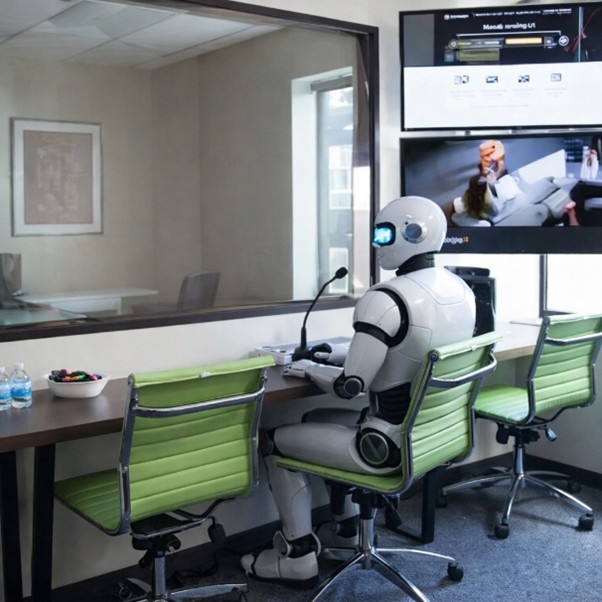
Figure 1: AI-generated image of a robot observing a usability test session.
Watching lots of videos can be time-consuming and tedious. Usability problems often aren’t obvious defects in an interface. They can come from perfectly compiled code and a beautiful interface. Due to the well-known evaluator effect, even trained professionals do not detect usability problems with perfect consistency.
Can AI really uncover usability problems like UX researchers?
A few years ago, this sort of question seemed like science fiction. Now it’s not if but how well AI can watch videos like a researcher or research assistant. Can human researchers use it and trust the results?
How Does AI “Watch” a Video?
Here’s a 15-second clip of a participant starting the task of finding a sushi restaurant on the OpenTable website. It’s part of a six-minute video of an unmoderated usability test conducted on the MUiQ platform.
Video 1: First 15 seconds of the OpenTable.com video.
We asked Gemini 3.1 Pro to “Please tell me in extreme detail what you see in the video from start to finish going second by second.” Here’s how it responded:
- 00:00–00:04: The video begins on the OpenTable.com homepage. The top navigation bar shows options for “For Business,” “Mobile,” “Help,” language selection (“EN”), and buttons for “Sign up” and “Sign in.” The main search area displays default parameters: a date of “Jul 19, 2022,” a time of “7:00 PM,” and a party size of “2 people.” The search bar says “Location, Restaurant, or Cuisine” with a red “Let’s go” button. Below this is a message reading, “It looks like you’re in Dallas Suburbs. Not correct? Get current location.” A section titled “Book for dinner tonight” shows several restaurants, including Fogo de Chao, Lombardi Cucina Italiana, Seasons 52, and Perry’s Steakhouse. At the bottom of the screen, a task description box outlines the user’s objective: booking a sushi restaurant in Denver, CO for four people tomorrow after 5:00 PM. The user begins speaking, stating they are looking for a sushi restaurant.
- 00:05–00:09: The user’s mouse cursor idles on the left side of the screen. The user continues speaking, noting they need a reservation for tomorrow anytime after 5:00 PM. They observe that today is the 19th, so they need to book for the 20th.
- 00:10–00:11: The cursor moves to the date selector and clicks on “Jul 19, 2022.” A calendar dropdown appears. The user clicks on the number “20” to change the date to Jul 20, 2022.
- 00:12–00:15: The user moves the cursor to the time selector, currently set at “7:00 PM,” and clicks it. A dropdown menu of times in 30-minute increments appears. The user scrolls up and clicks on “5:00 PM.”
Even though the summary of the onscreen text describing the user task does not include all task requirements (which we did not specifically prompt for), this is a reasonably accurate description of what’s on the screen and the events.
Gemini didn’t actually watch the video the way we do. It doesn’t experience a continuous stream of motion or notice subtle hesitation in real time. Instead, it only samples a few frames (often only one to two frames out of the 30 frames) per second of the video.
Each frame is then broken into smaller regions and converted into numerical representations that the model can process. If there’s audio, spoken words are transcribed into text and aligned with those frames. By the time the model begins “analyzing,” the video has already been reduced to a combination of image fragments and text.
From there, the model treats those inputs similarly to how it processes language. The visual and textual information is converted into tokens (small chunks of data) and passed through a neural network that looks for patterns (things such as interface elements, changes in screens, or sequences of actions).
Autocorrect for Video Watching
Because AI is working from snapshots rather than continuous playback, it doesn’t directly see motion. Instead, it infers what likely happened between frames (for example, that a user scrolled, tapped, or navigated to a new page). This makes the process efficient, but it also means short or subtle behaviors can be missed.
Based on the sampled frames and any accompanying text, it generates the most likely description of what happened, much like how it predicts the next word in a sentence. Basically, it’s like autocorrect on steroids for videos.
That’s why the output can sound surprisingly natural and insightful, even when it’s not entirely accurate. It’s less like a researcher watching a session and more like a system generating a plausible narrative from partial information.
Losing Frames
As long as there’s been autocorrect, there’s been, well, mistakes (often hilarious ones). The sampling that makes AI fast also makes it “lossy.” By looking at only a fraction of the frames, the model can miss brief moments of hesitation, confusion, or micro-interactions that are often critical in usability analysis. What’s efficient for processing might not always be sufficient for insight.
Probabilistic Output
But unlike autocorrect, which works the same each time it’s presented with a partial word, AI outputs aren’t always the same. They’re probabilistic rather than deterministic. Even with the same video and the same prompt, the model may generate slightly different descriptions each time. That’s because it’s not retrieving a fixed answer but generating the most likely sequence of words from a range of possibilities. The results can be consistent in general themes, but not identical in wording or even emphasis. And with current systems, there is always the possibility of hallucination. For researchers, these concerns mean that AI outputs should be treated less like definitive observations and more like plausible interpretations that still needs validation.
Temperature
Part of this variability comes from a setting called temperature, which controls how much randomness the model uses when generating responses. Temperature typically ranges from 0 (close to deterministic) to around 2 (much more variable). Most models use a middle setting by default, which balances consistency and variation. Higher temperatures can surface a wider range of interpretations (sometimes useful for exploratory analysis), while lower temperatures produce more consistent outputs—but even then, results aren’t perfectly repeatable.
Figure 2 illustrates this process.
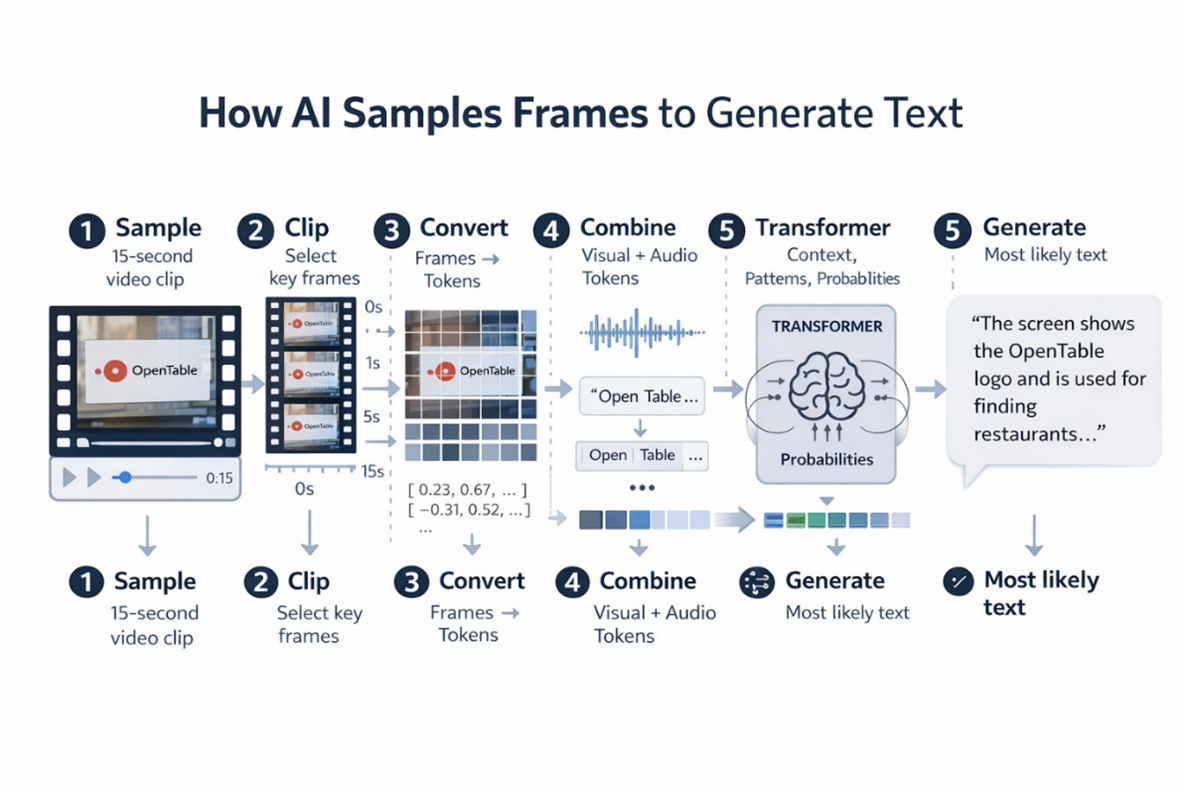
Figure 2: Visual overview of how an AI “watches” a video.
This gives you an idea about how AI reviews videos for usability problems. But what does it look like when you ask an AI to perform a usability evaluation of a video?
Problem List from ChatGPT
We uploaded the full six-minute video of a person attempting to find a sushi restaurant in Denver on the OpenTable website into ChatGPT (model 5.4 Thinking). We selected the video because it has several known usability problems that humans consistently detect. We prompted ChatGPT with:
“During a usability test, the facilitator must keep track of participant behaviors as they navigate through tasks on a website, mobile app, software program, etc. We’d like you to watch a video of a usability test where participants were asked to book a table at a Sushi restaurant. As you’re watching, please look for problems the participant has while attempting to complete the task. For example, you can document the path users take, describe issues they encounter as well as what on the website might be causing problems. If you understand these instructions, let me know and I’ll drag the video in for you to review. Are you ready for the video?”
ChatGPT indicated “yes,” then took only three minutes to process the video (half the time of the six minutes because it sampled a fraction of the frames to piece together its visual autocorrect narrative).
From its output, we derived a list of seven usability problems (Table 1).
| Problem List |
|---|
| Complex search field with placeholder text and unexpected behaviors significantly delayed user who selected sushi from search bar dropdown but for Dallas (default) instead of Denver |
| Entering Denver in search field lost previous selection of sushi as cuisine |
| Search results for sushi included many non-sushi restaurants |
| Weak presentation of cuisine information in search results |
| Participant seemed to miss price point filter—sorted on ratings and examined price points in descriptions |
| UI pushes browsing without good decision support |
| Selected restaurant was categorized as Seafood instead of Sushi, so participant failed the task |
Table 1: List of problems “discovered” by ChatGPT review of usability test video.
Looks Good, However …
On the surface, that looks pretty good. It’s plausible, specific, and aligned with what a researcher might note. But it leaves us with a few questions:
- How many of these are actual usability problems versus plausible-sounding interpretations (autocorrect) or hallucinations?
- How consistent are the results across multiple runs (reliability)?
- How closely do these match what human UX researchers would identify (validity)?
We’ll explore these important questions in future articles.